Tutorials · 6 min read
Color that tells a story
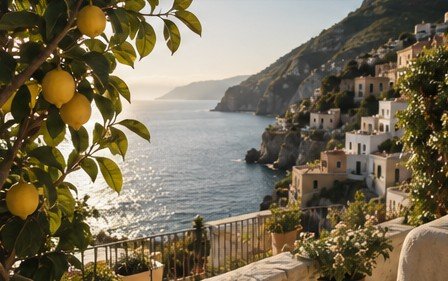
Using the HSL mixer and colour grading to steer the mood of a travel photo without making it look edited.
Every photo has a lead colour and a supporting cast. In a Mediterranean street, the lead is lemon-yellow; the cast is the blue of the sea and the ochre of the walls. The mixer lets you tune each one independently.
Yellow: Saturation +14, Luminance +6. Blue: Hue −6, Saturation +12. Orange: Luminance +4 to lift the walls. Then in Effects, add a warm highlight grade (hue 40, saturation 15) and a cool shadow grade (hue 210, saturation 10) — the classic split that makes an image feel intentional.
The AI prompt can do the same in one line: “make the lemons pop, cool the shadows slightly, keep the skin natural.” AI Develop translates that into HSL and grading values you can inspect in the panel.